Using Aprimo with n8n
Agentic Orchestration with MCP, Workflow Templates, and Proxied Tool Execution
Agentic orchestration is one of the fastest-moving areas in enterprise software. Aprimo is actively investing in integrations, tooling, and guidance for platforms that support agent-based workflows.
n8n provides a practical way to expose Aprimo capabilities into an MCP-compatible ecosystem without requiring each tool to be hand-coded in a traditional application layer. In this model, workflows become the execution surface, MCP becomes the exposure layer, and a client such as Claude Desktop or another MCP-compatible experience becomes the consumer.
This approach is especially useful when the goal is to connect Aprimo into an agent workflow quickly, support multi-step orchestration, and make tool logic accessible to teams that prefer visual workflow design over custom-coded services.
Understanding n8n in an MCP Architecture
In a conventional MCP server implementation, a developer typically writes code that defines tools directly. Those tools may be implemented in Python, TypeScript, or another supported language, and the server is responsible for advertising tool metadata, validating inputs, invoking business logic, and returning structured results.
n8n introduces a different model.
Instead of hand-coding each tool inside a custom MCP server, n8n allows workflow logic to define the execution path. A lightweight MCP-facing workflow exposes tool definitions, and separate execution workflows perform the actual work. This means the logic for a tool can be designed visually, updated incrementally, and reused across multiple use cases without rewriting the server itself.
At a high level, the architecture looks like this:
Visual workflow → exposed as MCP → proxied → consumed by client
In practice, that means:
- n8n hosts the workflow definitions
- a parent workflow exposes one or more tool entry points through MCP
- a child workflow encapsulates the real Aprimo interaction logic
- an optional proxy secures and forwards MCP traffic
- an MCP client discovers and invokes those tools
This differs from a traditional coded MCP server in an important way: the server behavior is defined more by workflow composition than by application code.
Understanding the Two-Workflow Model in n8n
A useful way to think about n8n’s MCP approach is that it separates tool exposure from tool execution.
The implementation commonly uses two workflows.
MCP Server Workflow
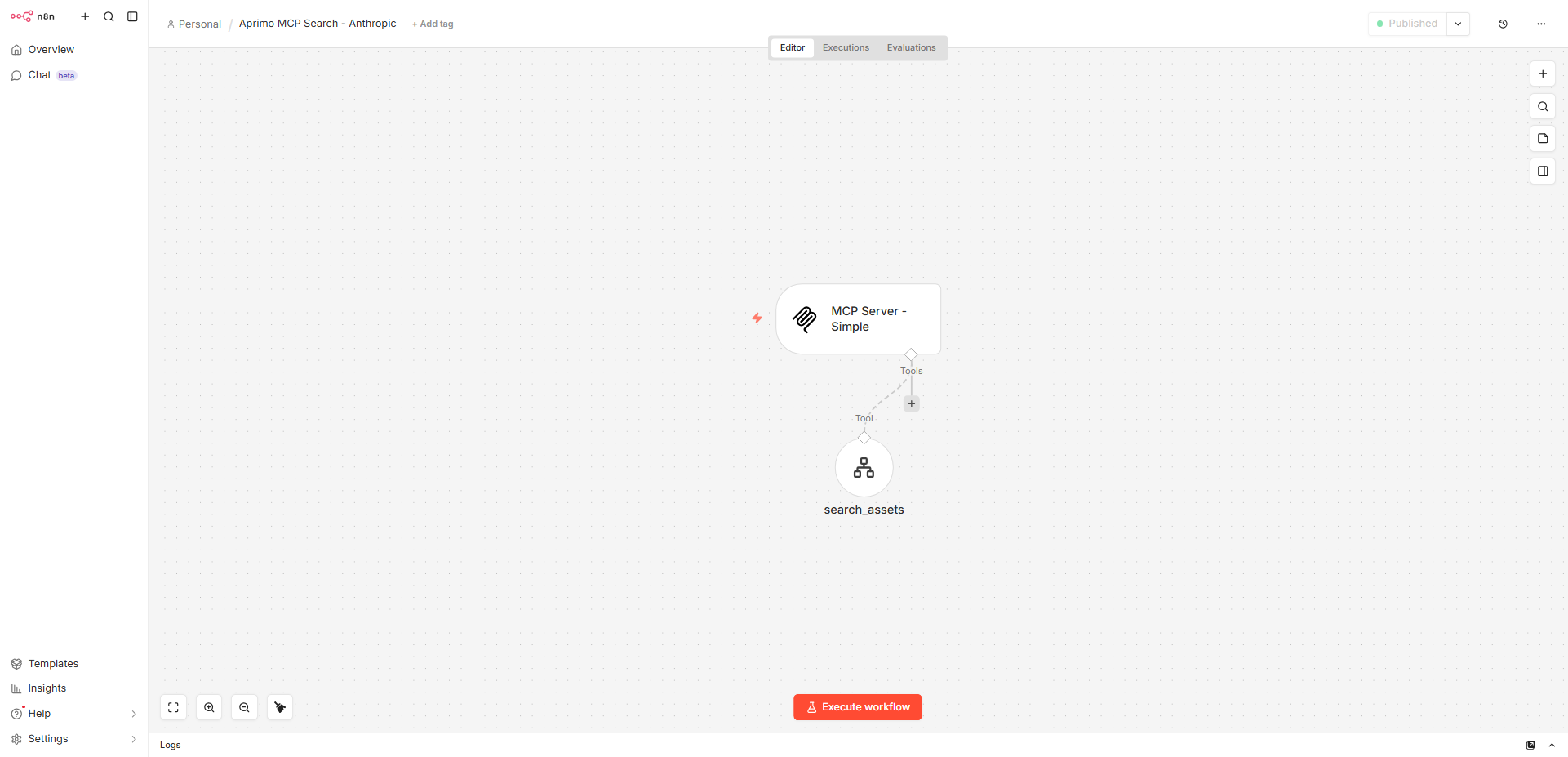
The first workflow acts as the MCP-facing layer. This is the workflow that defines the MCP endpoint and exposes one or more tool definitions to the client.
Its responsibilities are typically:
- define the MCP trigger path
- expose tool names and descriptions
- define expected tool inputs
- route tool invocations to the appropriate downstream workflow
This workflow is not usually where the business logic lives. Instead, it acts as the contract layer between the MCP client and the execution logic.
In your implementation, this is the workflow that uses the MCP trigger and exposes a tool such as search_assets. The tool definition describes what the tool does and what inputs it expects, while the workflow delegates execution to a downstream workflow. That exposed tool model is visible in the parent workflow JSON, where the MCP trigger is paired with a tool workflow node referencing the search capability.
This is an important distinction because someone using n8n is not “building an MCP server from scratch” in the same way they would in Python. Instead, they are configuring an MCP-capable workflow that exposes tool definitions and forwards execution.
Child Tool Workflow
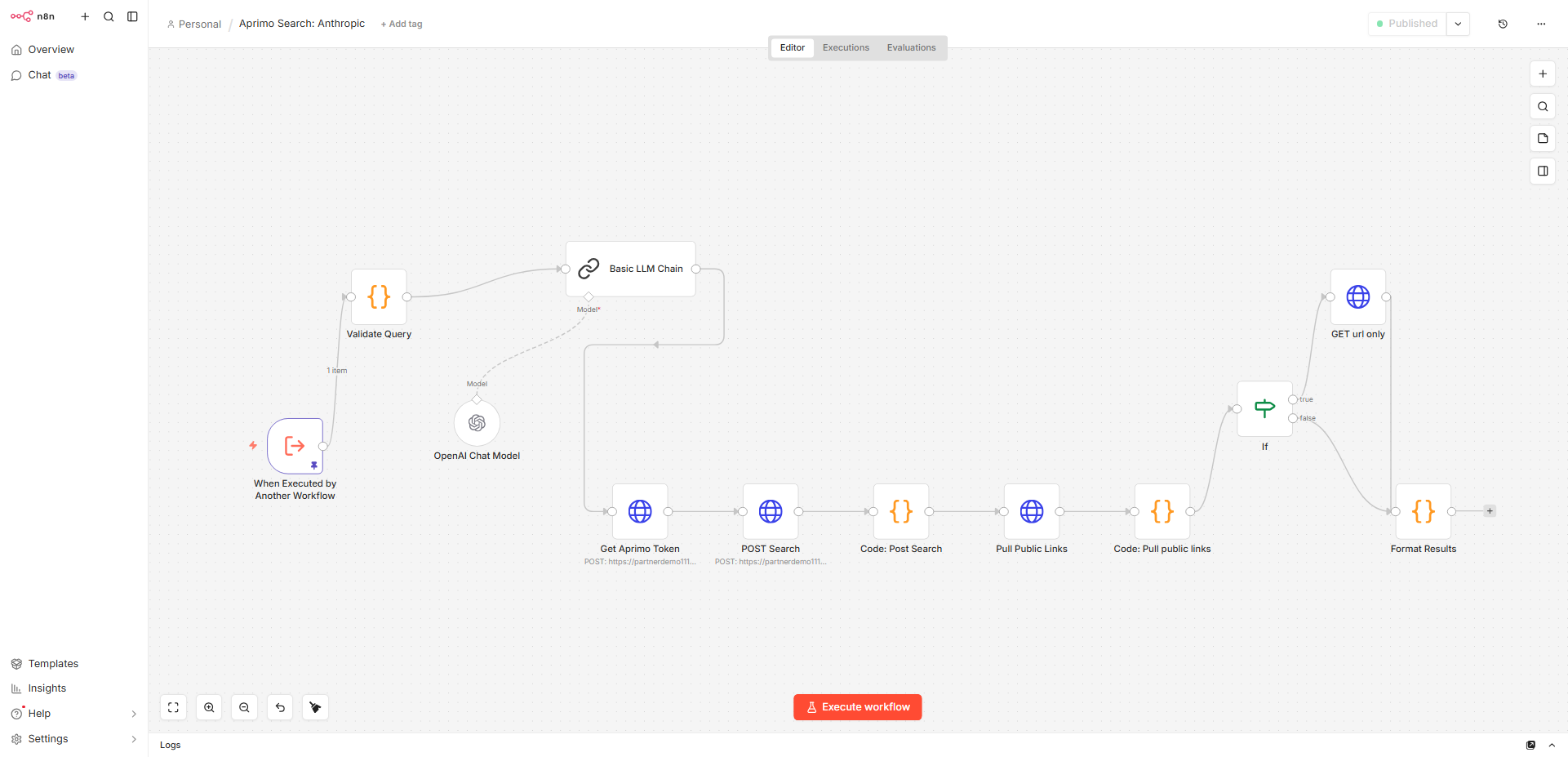
The second workflow contains the actual implementation of the tool capability.
This is the workflow that performs the Aprimo work itself. For example, a search child workflow may:
- validate the incoming query
- request an Aprimo access token
- execute the Aprimo search API call
- transform raw response data
- optionally enrich records with public links or image URLs
- return normalized JSON back to the caller
In your search implementation, this child workflow contains the Aprimo token request, the search request, response transformation, and final result formatting. It is the real tool logic, while the parent workflow is the MCP-facing wrapper.
This separation is one of the strongest aspects of the pattern because it keeps the MCP layer thin and lets each capability evolve independently.
Why This Pattern Matters
This two-workflow pattern solves several practical problems.
A custom-coded MCP server often blends together:
- the MCP protocol contract
- tool metadata
- authentication logic
- API orchestration
- response transformation
In n8n, these concerns can be split more cleanly.
The MCP server workflow can stay focused on exposure and invocation, while the child workflow can focus on Aprimo-specific orchestration. This makes the architecture easier to extend over time.
For example, adding a new Aprimo capability does not require modifying a custom codebase to register and implement an entirely new tool in application code. Instead, the typical path is:
- create a new child workflow for the capability
- expose it through the MCP-facing workflow
- activate it
- allow the client to discover and invoke it
That is a very different operational model from traditional server development.
Parent Workflow vs. Building a Custom MCP Server
It is useful to be explicit about the difference between these two approaches.
Custom MCP Server Approach
In a custom implementation, a developer typically:
- writes server code
- defines tools in code
- handles validation in code
- handles Aprimo API calls in code
- deploys and maintains the service as an application
This gives maximum control, but requires more engineering effort and typically creates a heavier dependency on developer-led changes.
n8n MCP Workflow Approach
In the n8n model, a builder typically:
- creates an MCP-facing workflow
- defines one or more exposed tools in that workflow
- delegates each tool to a child workflow
- implements business logic visually in n8n nodes
- optionally fronts the MCP endpoint with a proxy
This shifts more of the integration surface into configuration and workflow design.
The result is not “less serious” than a coded MCP server. It is simply a different design center:
- less emphasis on handcrafted server code
- more emphasis on reusable, inspectable orchestration workflows
Pattern Overview
The core architectural pattern can be summarized as:
Visual workflow → exposed as MCP → proxied → consumed by client
Each part serves a distinct role.
Visual workflow
n8n is where the logic lives. This is where Aprimo authentication, search expressions, conditional branches, payload shaping, and multi-step orchestration are defined.
This is especially useful for Aprimo scenarios because Aprimo integrations often involve:
- token acquisition
- multi-call sequences
- search request shaping
- metadata interpretation
- post-processing of results
Those are natural fits for workflow orchestration.
Exposed as MCP
The exposed MCP layer turns workflows into discoverable tools.
Instead of a client needing to know Aprimo’s REST endpoints, headers, or request bodies, it only needs to know that a tool exists and what inputs it accepts. The MCP abstraction becomes the contract.
Proxied
A proxy layer is optional but often important in real deployments.
In your project, the proxy is responsible for:
- protecting the exposed MCP path
- validating access tokens
- forwarding requests to the underlying n8n MCP endpoint
- preserving streaming behavior where needed
That proxy logic appears in the FastAPI proxy file, which checks authorization and forwards requests to the target MCP endpoint while filtering headers and preserving the streaming response path.
This becomes especially useful when the MCP endpoint should not be exposed directly or when tunneling, path control, or token enforcement is needed.
Consumed by client
Any MCP-compatible client can consume the exposed tools.
That might include:
- Claude Desktop
- a custom internal agent UI
- another orchestration client that understands MCP
The client does not need Aprimo-specific knowledge. It only needs the MCP server connection and the exposed tool contract.
Search Capability as a Concrete Example
The Aprimo search capability is a good example of how this pattern works in practice.
The parent workflow exposes a tool called search_assets. That tool accepts inputs such as a query and result limit, then forwards the call to a child workflow.
The child workflow then performs the actual search orchestration:
- validates the query
- retrieves an Aprimo token
- submits the Aprimo search request
- requests facets
- transforms the results into a client-friendly structure
- returns normalized output
The search expression itself is assembled in the workflow and targets multiple Aprimo fields such as display title, description, captions, and AI smart tags. The workflow also requests facet information such as content type, region, department, and keywords.
This demonstrates one of the main benefits of the workflow approach: the tool’s operational behavior is visible and editable at the orchestration layer rather than hidden inside a codebase.
Pre-Built Workflow Templates
One of the strongest practical benefits of this approach is that the workflows can be packaged as pre-built templates.
This changes the onboarding story significantly.
Instead of telling a team to:
- stand up a custom MCP service
- install dependencies
- write tool handlers
- code Aprimo authentication logic
- implement request/response normalization
you can instead provide:
- a parent MCP workflow template
- one or more child Aprimo tool templates
- a proxy template or companion script if needed
- environment variable guidance
A user can then import the templates, update credentials and endpoint values, and begin exposing Aprimo capabilities quickly.
That is one of the clearest differentiators of the n8n model. The implementation becomes much easier to distribute, reuse, and extend across teams.
Pros of the n8n MCP Workflow Model
This pattern has several clear advantages.
No need to code tools in Python
One of the biggest benefits is that Aprimo tool logic does not need to be implemented as custom Python tool handlers. For teams that do not want to maintain a separate code service, this is a significant simplification.
The logic is instead represented in workflows and configuration.
Easy to extend
Adding another capability usually means creating another workflow and exposing it through the MCP-facing layer.
Examples might include:
- searching records
- retrieving metadata definitions
- resolving taxonomy values
- updating record fields
- creating collections
- validating metadata
This makes the platform highly extensible without requiring each change to go through a software release cycle.
Business users can modify logic in n8n
This is often overlooked, but it matters.
Because the logic is visual, certain kinds of changes can be made by technically capable business users, solution architects, or integration specialists without requiring deep application development.
That does not remove the need for governance, but it can reduce bottlenecks.
Strong for APIs such as Aprimo
Aprimo is a strong fit for this model because many useful Aprimo capabilities are API-driven and orchestration-heavy.
n8n is especially effective when the tool behavior includes:
- authentication
- search payload construction
- branching logic
- conditional fallback
- multi-step enrichment
- output shaping
Strong for orchestration
This pattern shines when the tool is not just a single API call but a sequence of related operations.
For example:
- search Aprimo
- inspect results
- fetch additional details
- apply business rules
- return a normalized response
That kind of multi-step logic is easier to express in n8n than in a thin hand-coded tool function.
Strong for multi-step workflows
Many enterprise tasks require more than retrieval. They may require:
- validation
- enrichment
- transformation
- action chaining
- error branching
The workflow model is naturally suited to those cases.
Cons of the n8n MCP Workflow Model
This pattern also has tradeoffs, and those should be explicit.
Less control over tool behavior at code level
A custom-coded MCP server gives finer-grained control over exactly how tools validate inputs, manage state, structure errors, and optimize performance.
With n8n, the control surface is more abstracted. You can still shape behavior carefully, but the implementation is constrained by workflow design and the platform’s capabilities.
Debugging spans multiple layers
Debugging is typically broader than in a single code service.
When something fails, the issue may live in:
- n8n workflow logic
- proxy configuration
- MCP endpoint exposure
- client invocation behavior
- Aprimo API behavior
That means troubleshooting often requires following the request across multiple boundaries.
Performance is slightly more layered
Because the request may flow through:
- client
- proxy
- MCP-facing workflow
- child workflow
- Aprimo API
- response transformation
there is some added layering compared with a direct in-process coded tool.
For most orchestration use cases this is acceptable, but it is a real architectural tradeoff.
When to Choose This Pattern
This n8n MCP pattern is especially well suited when the goal is to:
- expose Aprimo capabilities quickly
- avoid building a custom MCP server codebase
- support reusable tool templates
- enable multi-step orchestration
- let integration teams modify behavior visually
- standardize client access through MCP
It is less ideal when the highest priority is:
- extremely fine-grained runtime control
- custom low-level server behavior
- maximum performance optimization
- deeply bespoke tool execution logic that exceeds the workflow model
In those cases, a custom MCP server may still be the better fit.
Metadata and Action Workflows
Search is only the starting point.
The same parent/child pattern can be applied to metadata and action scenarios.
A metadata child workflow may:
- look up field definitions
- resolve option list values
- retrieve classification identifiers
- return a normalized schema response
An action child workflow may:
- validate requested changes
- map user intent to field identifiers
- submit an Aprimo update request
- confirm the final state
This is where the workflow model becomes even more valuable, because these tasks often require more logic than a simple tool handler.
Security and Proxy Considerations
The proxy layer deserves explicit mention because it often becomes part of the production design.
The proxy is useful when you want to:
- avoid exposing raw local or internal n8n endpoints
- enforce shared-token access
- constrain access to specific paths
- support remote clients through a safer entry point
In your implementation, the proxy checks a shared token from headers or query parameters, restricts access to an allowed path, forwards the request to the target MCP base, and preserves streamed responses.
This makes the overall architecture more deployment-friendly and helps bridge the gap between local experimentation and a controlled hosted setup.
Putting the Pieces Together
The full pattern can be understood as four distinct layers.
The client layer is where the user interacts. This may be Claude Desktop or another MCP-capable experience.
The MCP exposure layer is the parent n8n workflow. It defines the tool contract and serves as the discovery/invocation surface.
The execution layer is the child workflow. It performs the real Aprimo logic, such as authentication, search, enrichment, or update.
The security and transport layer may include a proxy that controls how external clients reach the MCP endpoint.
The result is a modular architecture where each concern has a clear place.
Reference Workflow Templates (Importable)
To simplify adoption, a set of reusable n8n workflow templates are provided below. These implement the full MCP integration pattern and can be imported directly into n8n without modification.
MCP Server Workflow (Parent)
Exposes the MCP trigger endpoint, tool definitions, and routing logic to child workflows.
Download: aprimo-mcp-search-sanitized.json
Aprimo Search Workflow (Child)
Implements query validation, OAuth token retrieval, Aprimo search execution, facet handling, and result normalization.
Download: aprimo-search-child-sanitized.json
How to Use
- Download the JSON files above and import them into n8n
- Configure environment variables and credentials
- Activate workflows
- Connect your MCP client
No custom MCP server code is required. These templates provide a consistent, reusable foundation for exposing Aprimo capabilities into agent ecosystems.
Final Perspective
The n8n MCP model is not simply a shortcut for people who do not want to code. It is a different architectural style for exposing enterprise capabilities into agent ecosystems.
A traditional custom MCP server centers the implementation in application code.
The n8n model centers the implementation in orchestration workflows.
For Aprimo, that can be a strong fit because many useful capabilities involve API interaction, multi-step logic, and response shaping rather than only low-level code behavior. The use of parent and child workflows adds structure, the MCP layer standardizes tool exposure, and the proxy can provide a clean boundary for secure client consumption.
For teams that want reusable templates, visual extensibility, and fast onboarding into MCP-based experiences, this pattern provides a practical path to making Aprimo available as agent-callable tooling.