Check Framework API
These APIs are a work in a progress and minor changes may occur. Aprimo is working on expanding the check framework, and the UI is still being built to see these results.
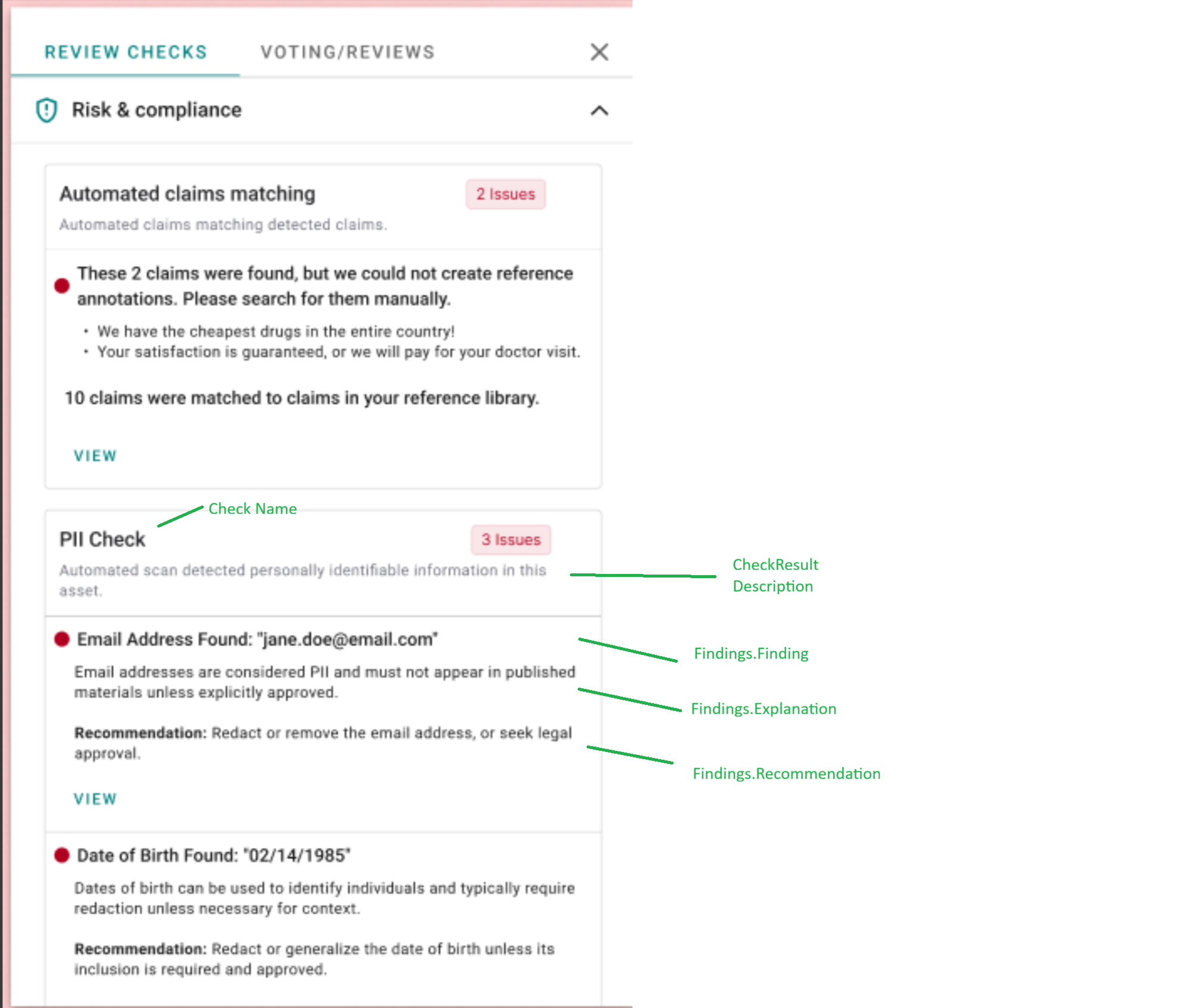
About the Check Framework
Aprimo's check framework APIs allows integrators to execute automatic review checks that run outside of the platform, but surface review findings in Aprimo easily.
By using these APIs, users in the system will see the review feedback in appropriate places. In 2025, this will be in the Annotation Viewer; in 2026 this will be expanded to be viewable directly on a content item in DAM. This is intended to support two use cases:
- Pre-flighting: Uploaders who need to see review feedback as soon as it's available after upload.
- Reviewers: Reviewers who need to see the results of automated checks while annotating content.
Examples of automated checks might include tone checks, brand color checks, tone of voice checks, logo checks, sizing checks, or any other automated check that marketing content calls for.
After you run your own custom check externally, you make an API call to create a single checkResult, along with multiple optional findings (explained in more detail below). These APIs are expected to be used in conjuction with DAM Rules or PM Workflow Status Action Webhooks, which trigger your external system to fetch content and execute a review check outside of Aprimo, then write the results back into Aprimo to the checkResult and findings objects.
Check Framework Objects
-
Check Categories – These are stock categories and cannot be customized or added to. When you create a
check, you select one of these categories upon creation. You can fetch these via API to get IDs, but know that the 4 categories out of the box are:- Risk & Compliance
- Brand Consistency
- Message Clarity
- Channel Readiness
You can decide which category best fits the
checkthat you're running. -
Checks – These let you label a repeatable
checkto run in the platform. In most cases, you'll start just by creating one, caching the ID on your side, and using the ID when creatingcheckResults. Some examples of acheckwould be "Brand Color Check", "QR Code Verifier", "Important Safety Information Check", "Disclosure Check", etc. -
File Version Check Results – This is the main object you will be writing to. Each time you process a piece of content, you will create a
checkResulttied to that file version for thecheckyou want to run. ThecheckResultobject lets you surface check text back to the user, for example: "Three issues were found", "Brand Colors Verified," as well as supply an outcome of Pass, Warning, Fail, or Info to be surfaced to the user. -
Findings – Optionally, once a
checkResultis created, you may also create individualfindings. Individualfindingsare useful when you want to detail out the specific issues found in content. These are optional and do not need to be created.findingshave a few key pieces of information surfaced to a user:- Finding - The Finding field on the
findingsobject is intended to hold text that is ideally present in the document. Users will be able to click to find this in the content. - Explanation - An optional explanation of why this finding was flagged.
- Recommendation - An optional recommendation surfaced to the user on what to do next.
- Finding - The Finding field on the
How to properly use CheckResults and Findings
In the Check Framework Objects section, we describe the object model and show basic usage examples. This section expands on those examples to outline best practices for when and how to use CheckResults and Findings, and how Aprimo surfaces these to users.
When to Use CheckResults vs. Findings
Every time your external system runs a check, users should receive a high-level summary of the results — even if no detailed findings are available.
That high-level summary belongs at the CheckResult level, and this is mandatory.
-
CheckResult – Represents the overall outcome of the automated check. It’s the summary message the user sees first — for example, "Three brand color issues found" or "All brand colors verified."
-
Findings – Optional. Use these when your check identifies specific, pinpointable elements within the content (e.g., a problematic sentence, image, or color value). Each finding provides supporting detail for the overall
CheckResult.
If your integration only provides general information or a link (for example, pointing to supplementary documentation), do not create a Finding — a single CheckResult with an outcome of 'info' is sufficient.
How To Properly Set Outcomes
When setting the outcome of a CheckResult or Finding it’s important to understand how the CheckResult and Finding levels interact.
You can set an outcome directly on the CheckResult, or you can rely on the Findings underneath it to determine the overall disposition automatically.
If You Only Use CheckResults
If your check does not include a Finding, you must explicitly set the outcome on the CheckResult.
This value directly determines what the user will see — a Pass, Fail, Warning, or Info badge — and provides the high-level summary of the check’s result.
Use this pattern when:
- The check returns a single high-level outcome (e.g., "All disclosures verified" or "Incorrect logo detected").
- The external system is not returning granular findings.
If You Use Findings
If your check includes Findings, the overall CheckResult outcome can be automatically rolled up based on the aggregate outcomes of its Findings.
We are currently working on a UI update to reflect this rollup - you may not see this in the application yet today, but this content is being provided so you will understand how these Findings will eventually be shown to the user.
This allows Aprimo to reflect a single, summarized badge without requiring you to manually calculate it.
Automatic Rollup Logic
If the CheckResult has no explicit outcome set (CheckResult.outcome = null), Aprimo determines what to display using the following logic:
| Condition (# of Findings) | Result | Example Badge |
|---|---|---|
| 0 findings | No badge shown | — |
| ≥1 fail (any number of warn/pass/info) | Red badge showing total number of issues (fail + warn) | “3 Issues” |
| ≥1 warn, 0 fail | Orange badge showing total number of warnings | “2 Warnings” |
| ≥1 pass, 0 fail, 0 warn | Green badge showing total number of passes | “4 Passed” |
| ≥1 info, 0 fail, 0 warn, 0 pass | Gray badge labeled “Info” | “Info” |
The purpose of this rollup is to provide users with an at-a-glance indicator of the most important state of the check — particularly whether there are any failures that need attention — without requiring your integration to manage that logic manually.
If you do set an explicit CheckResult.outcome, that value overrides the automatic rollup.
This gives you full control when you want to present a custom interpretation or a specific call to action (for example, always marking a CheckResult as Info regardless of underlying findings).
Design Intent
The CheckResult.outcome represents the most significant call to action for the user.
Think of it as the top-level signal:
"Do I need to fix something, review something, or just be informed?"
Findings then provide the supporting details — whether that means listing problems, verifying required elements, or surfacing contextual information.
Objects and Paths
Base path follows REST + HAL format.
| Resource | Endpoint |
|---|---|
| Check Categories | api/core/checkcategories |
| Checks | api/core/checks |
| File Version Check Results | api/core/fileversion/{fileVersionId}/CheckResults |
| Findings | api/core/fileversion/{fileVersionId}/CheckResult/{checkResultId}/Findings |
How to properly use CheckResults and Findings
In the Check Framework Objects section, we describe the object model and show basic usage examples. This section expands on those examples to outline best practices for when and how to use CheckResults and Findings, and how Aprimo surfaces these to users.
When to Use CheckResults vs. Findings
Every time your external system runs a check, users should receive a high-level summary of the results — even if no detailed findings are available.
That high-level summary belongs at the CheckResult level, and this is mandatory.
-
CheckResult – Represents the overall outcome of the automated check. It’s the summary message the user sees first — for example, “Three brand color issues found” or “All brand colors verified.”
-
Findings – Optional. Use these when your check identifies specific, pinpointable elements within the content (e.g., a problematic sentence, image, or color value). Each finding provides supporting detail for the overall CheckResult.
If your integration only provides general information or a link (for example, pointing to supplementary documentation), do not create Findings — a single CheckResult with outcome info is sufficient.
How To Properly Set Outcomes
When using outcomes, it’s important to understand how the CheckResult and Findings levels interact.
You can set an outcome directly on the CheckResult, or you can rely on the Findings underneath it to determine the overall disposition automatically.
If You Only Use CheckResults
If your check does not include Findings, you must explicitly set the outcome on the CheckResult.
This value directly determines what the user will see — a Pass, Fail, Warning, or Info badge — and provides the high-level summary of the check’s result.
Use this pattern when:
-
The check returns a single high-level outcome (e.g., “All disclosures verified” or “Incorrect logo detected”).
-
The external system is not returning granular findings.
If You Use Findings
If your check includes Findings, the overall CheckResult outcome can be automatically rolled up based on the aggregate outcomes of its Findings.
[!NOTE] Q4 2025 Update Note that we are currently working on a UI update to reflect this rollup - you may not see this in the application yet today, but this content is being provided so you will understand how these will eventually be shown to the user.
This allows Aprimo to reflect a single, summarized badge without requiring you to manually calculate it.
Automatic Rollup Logic
If the CheckResult has no explicit outcome set (CheckResult.outcome = null), Aprimo determines what to display using the following logic:
| Condition | Result | Example Badge |
|---|---|---|
| 0 findings | No badge shown | — |
| ≥1 fail (any number of warn/pass/info) | Red badge showing total number of issues (fail + warn) | “3 Issues” |
| ≥1 warn, 0 fail | Orange badge showing total number of warnings | “2 Warnings” |
| ≥1 pass, 0 fail, 0 warn | Green badge showing total number of passes | “4 Passed” |
| ≥1 info, 0 fail, 0 warn, 0 pass | Gray badge labeled “Info” | “Info” |
The purpose of this rollup is to provide users with an at-a-glance indicator of the most important state of the check — particularly whether there are any failures that need attention — without requiring your integration to manage that logic manually.
If you do set an explicit CheckResult.outcome, that value overrides the automatic rollup.
This gives you full control when you want to present a custom interpretation or a specific call to action (for example, always marking a check as “Info” regardless of underlying findings).
Design Intent
The CheckResult.outcome represents the most significant call to action for the user.
Think of it as the top-level signal:
“Do I need to fix something, review something, or just be informed?”
Findings then provide the supporting details — whether that means listing problems, verifying required elements, or surfacing contextual information.
Examples
Additional HTTP Headers are required to call into the DAM REST API. Please see other examples for overall API usage to include appropriate headers (i.e. Content-Type, API-VERSION, Authorization).
Check Categories
Get category by ID
Request:
GET /api/core/checkcategories/{id}
Response:
{
  "_links": { "self": { "href": "/checkcategories/7890..." } },
  "id": "7890...",
  "name": "Risk & Compliance"
}
Get all categories
GET /api/core/checkcategories
Checks
Get All Checks
Request
GET /api/core/checks
Create a Check
Request:
POST /api/core/checks
{
  "name": "Brand Color Check",
  "actionTypeId": "22caecb7-df49-446b-9ef8-c6838b3a309e",
  "checkCategoryId": "0fab5339-2911-4022-81be-15afa12dd7e1",
}
The actionTypeId should always be the guid presented. We will be defaulting this value in the future so it will not be required for the call.
The name attribute must be unique to the Aprimo environment.
Retrieve a Check
GET /api/core/checks/{id}
Update a Check
PUT /api/core/checks/{id}
{
	 "name": "Brand Color Check",
	 "actionTypeId": "22caecb7-df49-446b-9ef8-c6838b3a309e",
	 "checkCategoryId": "0fab5339-2911-4022-81be-15afa12dd7e1",
}
File Version Check Results
Create a Result
POST /api/core/fileversion/{fileVersionId}/CheckResults
{
	 "checkId": "4e0abe1380084b849ee0b35000da4940",
	 "outcome": "fail", // Options include: pass, fail, warning, info
	 "description": "The tone of voice is too blunt, please adjust to have it be more approachable."
}
The description attribute supports Markdown features and can be used to open a link in a new tab.
POST /api/core/fileversion/{fileVersionId}/CheckResults
{
	 "checkId": "4e0abe1380084b849ee0b35000da4940",
	 "outcome": "fail", // Options include: pass, fail, warning, info
	 "description": "Find more information about your check result here: [Check Result System](https://www.aprimo.com)"
}
Get Latest Result (by Check ID)
GET /api/core/fileversion/{fileVersionId}/CheckResult?CheckId={checkId}
Get all results for a file version
GET /api/core/fileversion/{fileVersionId}/CheckResults
Get result by ID
GET /api/core/fileversion/{fileVersionId}/CheckResult/{resultId}
Update a result
It is not common to update a result, as it's expected that a result would not change for a fileversion. What's more likely is that after a user uploads a new version of content, the check would re-run and create a new result on the new file version using the POST endpoint. However, this endpoint can be used to update results if something changes in the external check system or a check needs to be re-run for some reason.
PUT /api/core/fileversion/{fileVersionId}/CheckResult/{resultId}
{
	"outcome": "pass",
	"description": "The tone of voice is approachable."
}
Delete a result
DELETE /api/core/fileversion/{fileVersionId}/CheckResult/{resultId}
Findings
Create a finding
POST /api/core/fileversion/{fileVersionId}/CheckResult/{resultId}/Findings
{
	 "occurrence": 1, // An integer ID shown to the user to help them identify a specific finding.
	 "finding": "Our product is the only serious options - competitors are outdated and slow.",
	 "explanation": "This statement is overly blunt.",
	 "recommendation": "Replace with 'Our software helps you move faster and stay current, while alternatives may still rely on slower methods.'",
	 "outcome": "fail" // Options include: pass, fail, warning, info
}
The explanation and recommendation attribute both support Markdown features and can be used to create a Markdown link that will open a new tab.
POST /api/core/fileversion/{fileVersionId}/CheckResult/{resultId}/Findings
{
	 "occurrence": 1, // An integer ID shown to the user to help them identify a specific finding.
	 "finding": "Our product is the only serious options - competitors are outdated and slow.",
	 "explanation": "**This statement is overly blunt, so we've written it in bold**.",
	 "recommendation": "Replace with 'Our software helps you move faster and stay current, while alternatives may still rely on slower methods.' See [your findings](https://www.aprimo.com) for more advanced details.",
	 "outcome": "fail" // Options include: pass, fail, warning, info
}
The finding attribute does not support markdown features.
Get finding (by occurrence)
GET /api/core/fileversion/{fileVersionId}/CheckResult/{resultId}/Findings/{occurrence}
Get all findings for a result
GET /api/core/fileversion/{fileVersionId}/CheckResult/{resultId}/Findings
Update a finding
PUT /api/core/fileversion/{fileVersionId}/CheckResult/{resultId}/Findings/{occurrence}
{
	 "finding": "Our product is the only serious options - competitors are outdated and slow.",
	 "explanation": "This statement is overly blunt.",
	 "recommendation": "Replace with 'Our software helps you move faster and stay current, while alternatives may still rely on older methods.'",
	 "outcome": "fail" // Options include: pass, fail, warning, info
}
Delete a finding
DELETE /fileversion/{fileVersionId}/CheckResult/{resultId}/Findings/{occurrence}
Best Practice
Notify Users While a Check Is Processing
After initiating a check with an external system, immediately create a CheckResult to inform the user that the request was received and processing has begun. When the check completes, update that same CheckResult with the final outcome.
Create an In Progress CheckResult
POST /api/core/fileversion/{fileVersionId}/CheckResults
{
	 "checkId": "4e0abe1380084b849ee0b35000da4940",
	 "outcome": "info", // Options include: pass, fail, warning, info
	 "description": "In Progress"
}
Update The CheckResult With Final Results
PUT /api/core/fileversion/{fileVersionId}/CheckResult/{resultId}
{
	"outcome": "pass",
	"description": "The tone of voice is approachable."
}
Example Implementation
You can find our example implementation on our Aprimo Connect GitHub. The example implementation is there to get you started on building your own check framework.